In this example, a button and a field for entering a filename is added to the unpaginated HTML output. You are modifying a 5.6.2 Project where Message mode previously was used in the StoryTeller document. The document already has Story frames with linked Stories.
|
Example 24
|
|
2
|
|
3
|
|
4
|
|
5
|
|
6
|
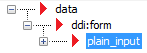
In the Interactive property grid within the Data template panel, enter my_button in the Input name field.
|
|
7
|
In the Value field, enter
|
|
8
|
|
9
|
|
10
|
Right-click and drag the group_item node into a Story frame where the button should be located. When you drop it, select Button from the list.
 |