You can use the #set directive to create arrays:
#set($<variableName>=[<element1>, <element1>, .., <elementN>])
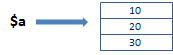
If you for example use #set($a=[10, 20, 30]) to create an array, Template Engine will first create the array object [10, 20, 30] and then create the variable $a that refers to the array object [10, 20, 30].

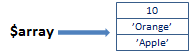
#set($var='Apple')
#set($array=[10, 'Orange', $var])
#set($array=[1..3])
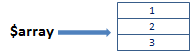
A range defines the first and last values in the array and all values in between incremented/decremented by 1. For example, the range [1..3] corresponds to the array [1, 2, 3] and the range [3..-1] corresponds to the array [3, 2, 1, 0, -1].
You can create an array dynamically by for example using the #foreach directive. First you create an empty array and then you use the #foreach directive to add the elements to the array. For example:
#set($array=[]) #foreach($i in [1..3]) $array.add($i) #end
Several array variables can refer to the same array object. For example, you can use #set($a=[10, 20, 30]) to create a new array, and then use #set($b=$a) to create a new array variable $b that refers to the same array object.
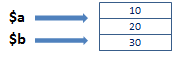
Note that #set($b=$a) does not create a copy of $a – the new array variable $b refers to the same array object as $a. If you modify the array object via $a then $b will refer to the same modified array object.