You can set modifications on a number of object properties and object data. A modification means that the value of an object property is replaced in runtime by the result of an evaluated XPath expression.
When you have selected a property in the Properties panel, you can enter an XPath expression or a $<variable_name> directly, or click the browse button, which opens the Data Selection dialog, see Data selection dialog.
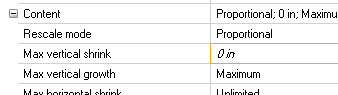
An orange border around the property value (in italic) indicates that a modification is specified for the property.

|
Figure 76
|
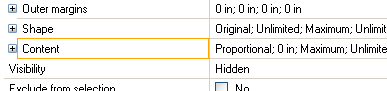
Also, you can see that there is a Modification set on a property inside a category, without having to expand the category.
|
Note:
|
Modifications are evaluated after the Script before on an object. When a modification does not return a value, the static property value is used.
|
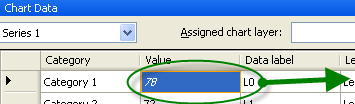
In addition, if a Modifications has been set on a property in the Chart data panel, the Properties panel visualizes the Modification:
|
Figure 78
|
|
•
|