You can enable runtime translation and design-time simulation of substitutions by setting the substitution to a key that identifies entries in an .sls language file.
|
•
|
Second column – ISO-standard language code with an optional country/region code, for example en-GB for British English.
|
|
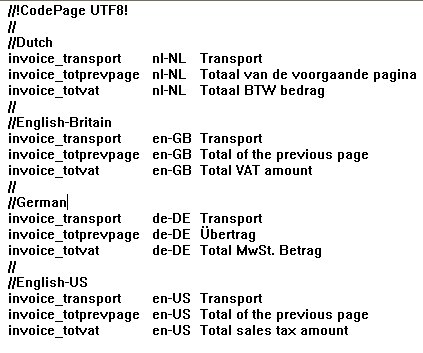
Example 60
|

|
Figure 48
|
Assume that you have the above file store in the resource set and you want three fields in your document to be translated during runtime.
|
1
|
When adding the fields, add them as Substitution type Translation and with invoice_transport, invoice_totprevpage, and invoice_totvat as Key.
|
|
2
|
|
3
|
Make sure you have a $language variable that evaluates to nl-NL, en-GB, de-DE, or en-US during runtime.
|
|
4
|
|
5
|
In Processing properties > Language Tables, browse to the language file in the resource set.
|
|
If you want the key to be dynamic, you can set a modification on the Key property with an XPath pointing to the field to translate.
|
