The logical graph coordinates (Y-axis) are used to adjust the input data to the physical dimensions of the chart on the PageOUT sheet, so that the bars are kept within the chart.
Make sure that the interval you set for the Y-axis covers the interval between the lowest and highest values in the input data. Also make sure that the interval is not too large. The following examples illustrate how you can set the interval for the Y-axis:
|
•
|
If the input data ranges from -50 to 50, set the interval for the Y-axis between -60 and 60.
|
|
•
|
If the input data ranges from 0.2 to 0.5, set the interval for the Y-axis between 0.1 and 0.6.
|
You use the logical graph coordinates (X-axis) to define margins, bar width, and bar gap in relative units. See Defining margins, bar width, and bar gap.
In basic mode, you define the logical graph coordinates along the Y-axis. The logical graph coordinates along the X-axis span from 0 to 100 and cannot be changed.
|
1
|
In the Chart Properties dialog box, enter the largest y-value in Max value.
|
|
2
|
Enter the lowest y-value in Min value.
|
|
1
|
In the Chart Properties dialog box, select Advanced options.
|
|
2
|
Enter the largest y-value in Y high.
|
|
3
|
Enter the lowest y-value in Y low.
|
|
4
|
Enter the largest x-value in X high.
|
|
5
|
Enter the lowest x-value in X low.
|
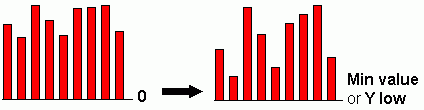
By default, bars are drawn from Y-value 0. If you want to create a more differentiated chart, you can draw the bars from the lowest Y-value (Min value or Y low) instead.

|
Figure 8
|
|
1
|
|
2
|
Select Draw from min value.
|