EasyLink connectors > Batch sending of messages

Batch sending of messages
In scenarios where a single StreamServe input job generates multiple emails, SMS, or faxes for EasyLink, the EasyLink output connector can group the output and send it in batches to EasyLink.
Performance considerations
Sending emails, SMS, or faxes to EasyLink in batches typically improves the performance of the EasyLink delivery services. Batches of 10 are recommended in most cases, however you should consider the average size of each fax, email, or SMS. Sending too many emails, SMS, or faxes in one batch will mostly likely have negative impact on performance. For example, sending one batch that contains 20 emails that are 5 MB each may cause a network time-out or mean additional overhead for EasyLink to process the batch.
Examples - Sending output in batches
These examples show how invoices are grouped into batches based on the batch setting in the EasyLink output connector.
In all three examples, the input file contains twenty-five invoices.
Example 3
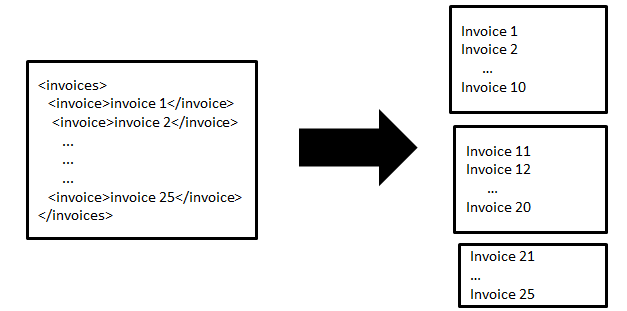
In this scenario, the connector groups the invoices into three batches. The first two batches contain 10 invoices and the last contains the remaining 5 invoices.Click to enlarge
 
 
Example 4
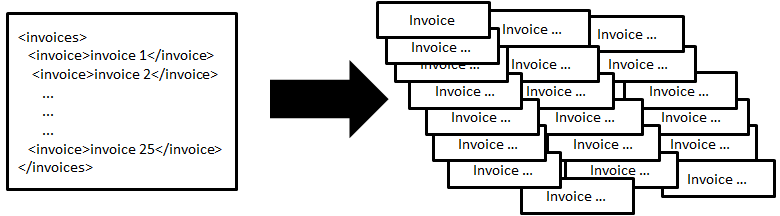
In this scenario, each invoice is sent individually to EasyLink.Click to enlarge
 
 
Example 5
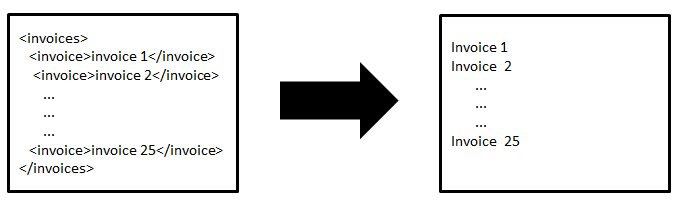
When a batch setting of 0 is used, all the invoices are sent in one batch to EasyLink. Use this option with care.
Click to enlarge
 
Batch size settings
You specify the number of emails, SMS, or faxes sent in each batch when you set up the connector (Batch size box in the Platform Connector Settings). For descriptions of the connector settings, see the following sections:


OpenText StreamServe 5.6.2 Updated: 2018-01-26