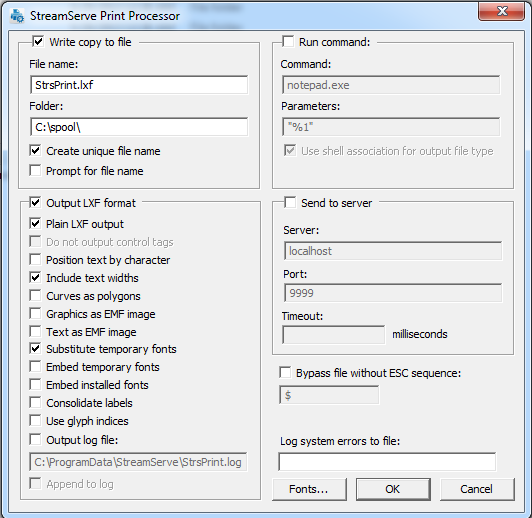
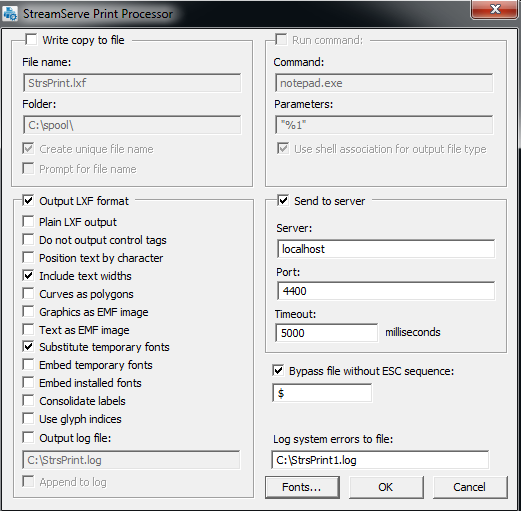
Examples – Configuring the Print Processor Example 1 Creating a local LXF file for a multi-page document This example shows how you can configure the Print Processor to produce a local LXF file that contains a multi-page document, which you can use as input for PreformatIN, or to import to Overlay Editor or StoryTeller. You can also use the LXF file as an overlay in PageOUT (single-page). Example 2 Configuring Print Processor to send data to an HTTP input connector This example shows how you can configure the Print Processor to produce LXF output as single-page documents in a data stream that is separated by keys, which can be defined by using Microsoft Word. This lets you insert PRINT fields in Microsoft Word and specify $key:value$ as the value of the field. The key and value, which come from the field content, are inserted between the LXF pages. An HTTP input connector receives this input, which is then processed by a StreamIN Event. They key-value pairs are extracted and the LXF is bypassed and sent to a Job Resource output connector.