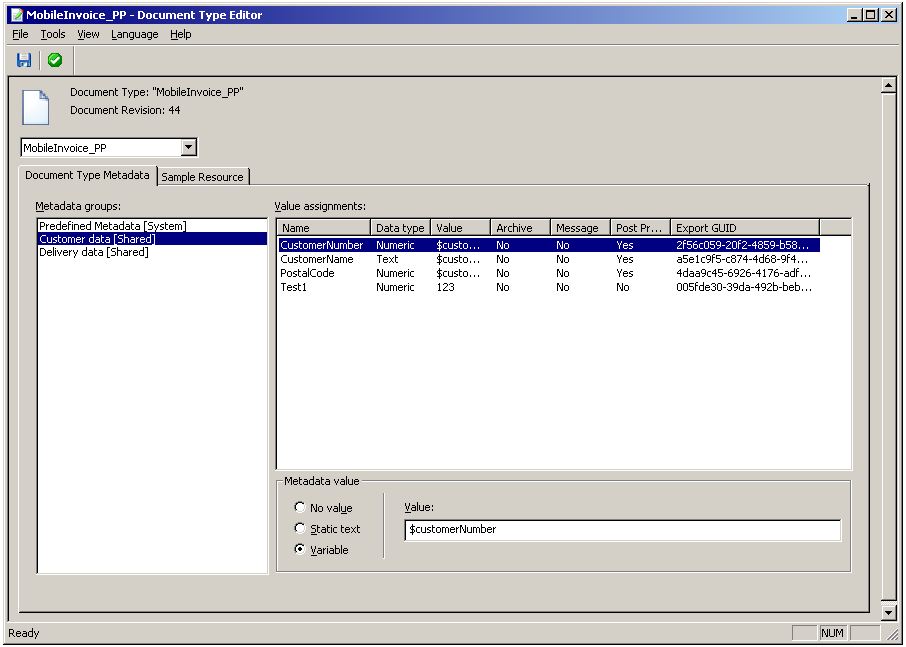
On the Document Type Metadata tab, when the top node in the context drop-down list is selected, you can assign values to the metadata added to the document type. First you must select a metadata group to display its metadata. Then you select metadata and specify the metadata values.
|
The value of the metadata. The value is assigned per document type (see Metadata value section below).
|
|
|
Shows whether the metadata is enabled in the Archive context. This is defined per document type.
|
|
|
Shows whether the metadata is enabled in the Message context. This is defined per document type.
|
|
|
Shows whether the metadata is enabled in the Post-processing context. This is defined per document type.
|
|
In this section you assign the value to the metadata selected in the Value assignments table. See Metadata values for information about valid values.
|
Used with E-Invoice Center where metadata values are assigned by filters.
|
|