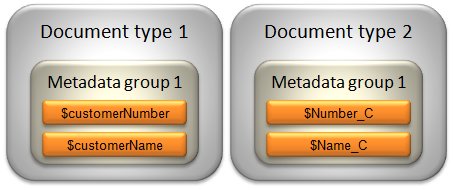
You can use static text or variables as metadata values. Variable values are retrieved from Event or script defined variables. Static text values are values that you enter directly in the document type resource. Note that dollar signs ($) cannot be used in static text values.
There is also an option to select No value for a metadata. This option is used with E-Invoice Center where metadata values are assigned by filters.
|
Note:
|
The values must conform to the data type specified for the metadata in the metadata group resource, i.e. Numeric, Date, or Text.
|
Date values must follow the ISO 8601 standard. Local time with offset to UTC (Coordinated Universal Time) is not supported. Examples of ISO 8601 date values are shown in the table below.
|
For example: 2010-05-20
|
|
|
For example: 2010-05-20T13:04:25
You can use the DtisoFormat scripting function to validate and format the value.
|
|
•
|
The maximum number of decimal digits that can be used to the left of the decimal separator is 15.
|
|
•
|
The maximum number of decimal digits that can be used to the right of the decimal separator is 8.
|
|
•
|
The maximum number of decimal digits that can be used in total, to both the left and the right of the decimal separator, is 15.
|
You can use the IsNum scripting function to validate numeric values.
If several document types use the same metadata group, you can assign different metadata values in the document types.