Collecting documents from a Document Broker repository > Configuring Post-processors

Configuring Post-processors
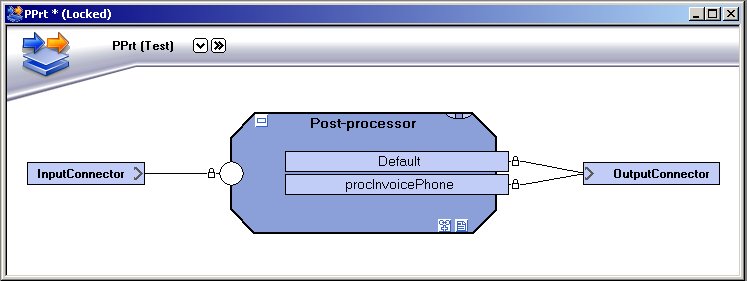
A Post-processor collects documents from a Document Broker repository, and does not include any Message configurations. The Post-processor retrieves a query via an input connector, executes the query, collects the documents from the Document Broker repository and delivers the documents via the appropriate output connector.
Output connector limitations
The output mode for the output connector must not be Process, and the following connectors cannot be used as Post-processor output connectors:
Process links
A Post-processor always includes a default Process link, which is used as the connection point to the output connector. To enable Process specific or Page specific output connector settings, you must add a new Process link to the Post-processor. This Process link must be linked to the Process that stored the corresponding document in the Document Broker repository.Click to enlarge
Figure 9
To create a Post-processor
1
Right-click the Runtime configuration view and select New Post-processor. A new Post-processor is added.
2
3
To add a new Process link
1
2
Browse to and select the appropriate Message and Process (you can multi-select Processes). The new Process links are added to the Post-processor, and connected to the same output connector as the Default Process link.
OpenText StreamServe 5.6.2 Updated: 2018-01-26