StreamServer configurations > Handling processing statistics

Handling processing statistics
Processing statistics
Processing statistics contain information about the usage of StreamServer and data on key objects, such as:
Defining custom counters
In the Design Center Project, you can also use custom counters in scripts to count other objects and transactions that are significant for your solution.
You can use the IncProcStatCounter script function to define counters for objects and to increase the value of the counters. For example, you can count specific XML elements, specific StreamOUT fields, and information retrieval from databases. For more information about the IncProcStatCounter function, see the OpenText StreamServe Scripting Reference.
When using custom counters, the name of the object to be counted must not exceed 255 characters.
Statistics stored in the runtime repository
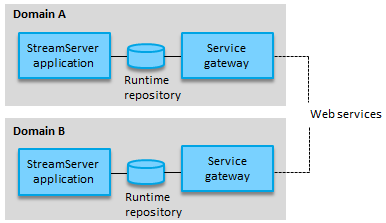
Processing statistics are by default stored in the runtime repository of an application domain. Only StreamServer applications that belong to the same domain store statistics in the same runtime repository.
Click to enlarge
Figure 11
Statistics stored in a central statistics repository
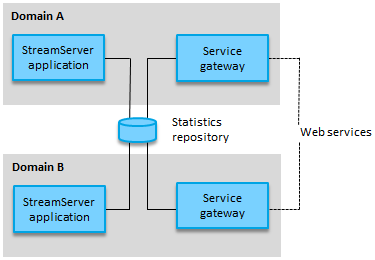
As an alternative to the default statistics storage in the runtime repository, a central statistics repository can be used. This statistics repository can be linked to several application domains and can consolidate processing statistics from StreamServer applications in all those domains.
When a statistics repository is linked to a domain, the StreamServer applications in this domain are automatically disconnected from the default statistics storage in the runtime repository and instead connected to the statistics repository.
Click to enlarge
Figure 12
Access statistics using web service SDK
You access the processing statistics in the repository using web services, included in the OpenText StreamServe Web Service SDK. All web service requests and responses are sent through the service gateway.
In this section
Related topics
OpenText StreamServe 5.6.2 Updated: 2018-01-26