You create an ADEP output connector the same way as you create other output connectors in Design Center.

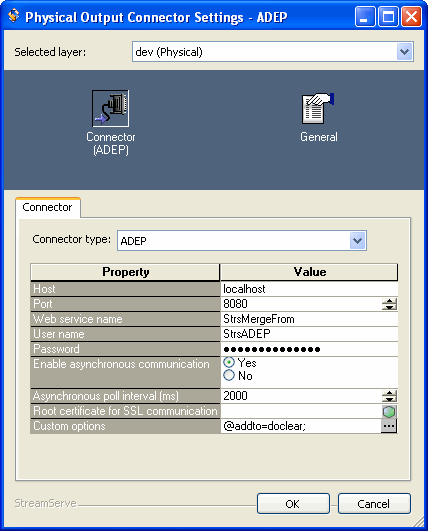
|
The host name or IP address of the server hosting ADEP. For example:
localhost |
|
8080 |
|
|
The name (case sensitive) of the service to invoke. This name must be the same as the corresponding process created in the Document Services Workbench.
|
|
|
User name to connect to the server hosting ADEP. Used in case of basic HTTP authentication.
|
|
|
Password to connect to the server hosting ADEP. Used in case of basic HTTP authentication.
|
|
|
Enable asynchronous communication
|
Yes – Make asynchronous calls to the service. This option is used when invoking long-lived ADEP services.
No – Make synchronous calls to the service. This option is used when invoking short-lived ADEP services.
|
|
Only used together with asynchronous calls. This is the interval (milliseconds) used to check for a response to the invocation request.
|
|
|
Root certificate for SSL communication
|
The root certificate used when HTTPS is used as web service protocol (secure communication). The certificate must be available from a resource set connected to the Platform.
|
|
A list of custom keys (key-value pairs) to include in the invocation request.
To be able to handle custom keys, the service must have a variable named optionsMap of the type map. All custom keys defined here will be added to the optionsMap variable in the invoked service.
The values provided can be extracted in the receiving Document Services Process by using an XPath expression in the Document Services Process.
Examples of custom keys are passwords for creating password encrypted PDF files. For example:
Key: pdfpassword
Value: encrypted
|